Lab brief & addressing
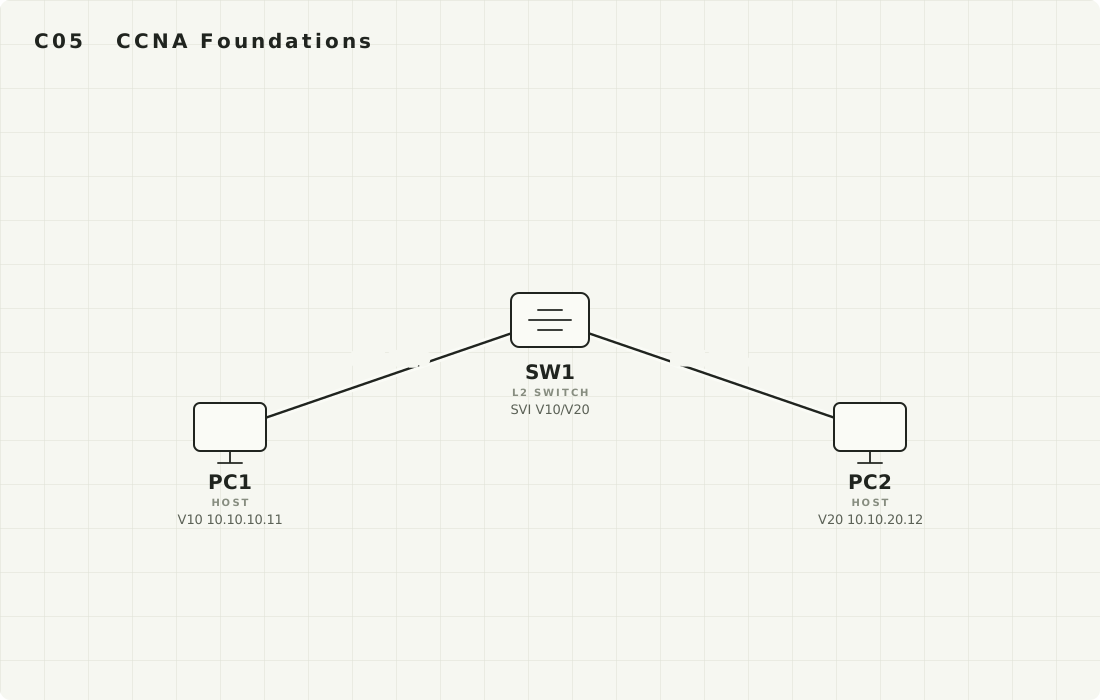
Topology Open full size ↗
The Mission
One multilayer switch, two PCs in two different VLANs. By the end, PC1 (VLAN 10) must ping PC2 (VLAN 20) and you must prove the switch itself routed it — with no router and no router-on-a-stick anywhere in the topology. The proof is two C routes in show ip route, one via Vlan10 and one via Vlan20.
You'll be able to
- Turn a Layer 2 switch into a router for its own VLANs with one global command and a pair of SVIs.
- Explain why an SVI's line protocol stays
downuntil an access port in that VLAN comes up. - Tell apart "the SVIs are up" from "the box is actually routing" — they are not the same thing.
Before you start
- Finished C04 (you've done inter-VLAN routing the slow way, on a router sub-interface).
- One IOSvL2 switch (SW1) with two VPCS PCs cabled: PC1 ↔ Gi0/0, PC2 ↔ Gi0/1.
Addressing plan
| Device / Interface | Address (/mask) | Gateway |
|---|---|---|
SW1 SVI Vlan10 | 10.10.10.1 / 24 | — |
| PC1 (VLAN 10, on Gi0/0) | 10.10.10.11 / 24 | 10.10.10.1 |
SW1 SVI Vlan20 | 10.10.20.1 / 24 | — |
| PC2 (VLAN 20, on Gi0/1) | 10.10.20.12 / 24 | 10.10.20.1 |
The one idea behind this lab
A multilayer (Layer 3) switch can route between VLANs by itself. Each VLAN gets a virtual interface called an SVI — interface Vlan10, interface Vlan20 — and that SVI's IP address becomes the default gateway for every host in that VLAN. The switch already moves frames within a VLAN; once you type ip routing, it will also move packets between its SVIs in hardware. This is the cleaner, faster replacement for C04's router-on-a-stick: no external router, no trunk, no sub-interfaces. One catch defines the whole lab: an SVI's line protocol stays down until at least one access port in that VLAN is up — the SVI is virtual, but it leans on real ports.
See & Do Build VLAN 10 and route to PC1
Type these on SW1 exactly. After each block, read the output panel before moving on — the point is to connect a command to the change it causes.
Enable routing and create the VLANs
SW1> enable
SW1# configure terminal
SW1(config)# ip routing                 ! the one line that turns the switch into a router
SW1(config)# vlan 10
SW1(config-vlan)# name USERS
SW1(config-vlan)# vlan 20
SW1(config-vlan)# name SERVERS
SW1(config-vlan)# exit
show vlan brief; you should see VLAN 10 and 20 listed with no ports assigned to them yet.Put PC1's port into VLAN 10 as an access port
SW1(config)# interface GigabitEthernet0/0
SW1(config-if)# switchport mode access
SW1(config-if)# switchport access vlan 10
SW1(config-if)# no shutdown
SW1(config-if)# exit
%LINEPROTO-5-UPDOWN: ... GigabitEthernet0/0, changed state to up. This up port in VLAN 10 is what will let the Vlan10 SVI come up in the next step — remember that link.Create the Vlan10 SVI — the gateway for VLAN 10
SW1(config)# interface Vlan10
SW1(config-if)# ip address 10.10.10.1 255.255.255.0
SW1(config-if)# no shutdown
SW1(config-if)# end
%LINEPROTO-5-UPDOWN: Line protocol on Interface Vlan10, changed state to up
It went up/up because step 2 gave VLAN 10 a live access port. If you had skipped step 2, this SVI would sit Vlan10 ... up / down — admin-up but line-protocol-down — with no host able to reach it.Address PC1 on the VPCS console
PC1> ip 10.10.10.11 255.255.255.0 10.10.10.1
PC1> show ip
NAME        : PC1[1]
IP/MASK     : 10.10.10.11/24
GATEWAY     : 10.10.10.1
DNS         :
10.10.10.1 — the SVI's IP. The PC's gateway must equal its own VLAN's SVI, never the other VLAN's.Prove it — PC1 reaches its gateway, and a C route exists
PC1> ping 10.10.10.1
84 bytes from 10.10.10.1 icmp_seq=1 ttl=255 time=1.204 ms
84 bytes from 10.10.10.1 icmp_seq=2 ttl=255 time=0.918 ms
84 bytes from 10.10.10.1 icmp_seq=3 ttl=255 time=0.951 ms
SW1# show ip route
      10.0.0.0/8 is variably subnetted, 2 subnets, 2 masks
C        10.10.10.0/24 is directly connected, Vlan10
L        10.10.10.1/32 is directly connected, Vlan10
C 10.10.10.0/24 ... Vlan10 means the switch now routes for VLAN 10 through its SVI — that connected route only exists because the SVI is up/up. There is just one VLAN routed so far. Build the second one and the cross-VLAN magic appears.Now You (guided) Add VLAN 20 and route PC1 ↔ PC2
VLAN 20 is the same recipe as VLAN 10 — but this time you write it. You have the addressing plan. I'll tell you what to achieve and which command family; you produce the exact lines.
- Put
Gi0/1into VLAN 20 as an access port and bring it up (this is what lets the Vlan20 SVI rise). - Create
interface Vlan20, give it10.10.20.1/24,no shutdown. - On PC2's VPCS console, set
10.10.20.12/24with gateway10.10.20.1.
Target to hit: from PC1, ping 10.10.20.12 succeeds — a packet that crosses from VLAN 10 to VLAN 20, routed entirely by SW1's two SVIs.
Stuck? Reveal the VLAN 20 config and PC2 setup
SW1(config)# interface GigabitEthernet0/1
SW1(config-if)# switchport mode access
SW1(config-if)# switchport access vlan 20
SW1(config-if)# no shutdown
SW1(config-if)# interface Vlan20
SW1(config-if)# ip address 10.10.20.1 255.255.255.0
SW1(config-if)# no shutdown
SW1(config-if)# end
PC2> ip 10.10.20.12 255.255.255.0 10.10.20.1
What "correct" looks like
SW1# show ip route
      10.0.0.0/8 is variably subnetted, 4 subnets, 2 masks
C        10.10.10.0/24 is directly connected, Vlan10
L        10.10.10.1/32 is directly connected, Vlan10
C        10.10.20.0/24 is directly connected, Vlan20
L        10.10.20.1/32 is directly connected, Vlan20

PC1> ping 10.10.20.12
84 bytes from 10.10.20.12 icmp_seq=1 ttl=63 time=1.510 ms
84 bytes from 10.10.20.12 icmp_seq=2 ttl=63 time=1.083 ms
84 bytes from 10.10.20.12 icmp_seq=3 ttl=63 time=1.142 ms
Notice the ttl=63 in PC2's replies — one less than the 64 a host sends with. That single decrement is the switch routing the packet (every routed hop costs 1 TTL). Two C routes, two SVIs, one box doing the inter-VLAN job a whole router used to do in C04.
Solo Challenge No commands this time
Do this from memory
Add a third VLAN, VLAN 30 (10.10.30.0/24), routed by its own SVI. Decide the SVI's name, the SVI's IP, and what a PC in VLAN 30 must use as its gateway. Then explain the one thing that will keep that SVI's line protocol down until you fix it.
You pass when all of these are true:
- The SVI is
interface Vlan30with IP10.10.30.1/24, and a VLAN-30 host's gateway is10.10.30.1. show ip routeon SW1 listsC 10.10.30.0/24 ... Vlan30.- You can state, in one sentence, the single condition that holds
Vlan30atup/down— and the exact kind of command that clears it.
Check your reasoning (open only after you've done it)
The Vlan30 SVI stays line-protocol down until at least one access port is assigned to VLAN 30 and is up (e.g. switchport access vlan 30 + no shutdown on some port). An SVI has no physical existence of its own; IOS keeps it down while its VLAN has no live member port, because routing into an empty VLAN would be pointless. The instant a port in VLAN 30 comes up, the SVI flips to up/up and the C 10.10.30.0/24 route appears. (Enabling the VLAN itself — not having it shut in the VLAN database — is the other half of the same idea.)
Break & Fix The SVIs are up — so why won't it route?
Now cause a failure whose fingerprint fools people every time. On SW1, turn routing back off while leaving both SVIs perfectly configured:
SW1(config)# no ip routing ! SVIs stay up/up, but the box stops being a router
Check the interfaces — everything still looks healthy:
SW1# show ip interface brief | include Vlan
Vlan10                 10.10.10.1      YES manual up                    up
Vlan20                 10.10.20.1      YES manual up                    up
Intra-VLAN still works (PC1 can still reach its own gateway), but the cross-VLAN ping now dies:
PC1> ping 10.10.20.12
host (10.10.20.12) not reachable

PC1> ping 10.10.10.1
84 bytes from 10.10.10.1 icmp_seq=1 ttl=255 time=0.901 ms   ! own gateway: still fine
up/up, each PC reaches its own gateway, but traffic between VLANs is gone. That pattern — "SVIs exist and are up, intra-VLAN fine, inter-VLAN dead" — means the switch isn't routing. Confirm it:SW1# show ip route % IP routing not enabled.
ip routing — and without it the SVIs are just a pile of disconnected gateways.Now fix it: re-enter ip routing in global config and watch the two C routes return to show ip route; PC1's cross-VLAN ping to PC2 succeeds again within a second.
SW1(config)# ip routing
Done check
Close this lab when, with routing restored, all of these are true:
| Run this | Proof you want |
|---|---|
show ip route (SW1) | Both C 10.10.10.0/24 ... Vlan10 and C 10.10.20.0/24 ... Vlan20 |
show ip interface brief | include Vlan | Vlan10 and Vlan20 both up / up |
ping 10.10.10.1 (PC1) | Replies — PC1 reaches its own SVI gateway |
ping 10.10.20.12 (PC1) | Replies with ttl=63 — cross-VLAN, routed by SW1 |